ADN Xtra Labs and API Changes since Revit 2013
Originally Published inAs usual, I am answering Revit API cases and maintaining the documentation and training material.
What I really should be doing is preparing my upcoming class for Autodesk University in Darmstadt.
On the good side, I went for a nice climb up the south ridge of Bergseeschijen ↗:

Here are some of the things I dealt with today:
- API changes from Revit 2013 to Revit 2017
- ADN Xtra Revit API Labs for Revit 2018
- Access to modified combo box setting
API Changes from Revit 2013 to Revit 2017
Stever66 ↗ very kindly shared an useful document in the Revit API discussion forum ↗ thread on changes and additions to the Revit API 2013 to 2017 ↗ that deserves mentioning and safeguarding here as well:
He says:
I got tired of searching 4 or 5 different documents for keywords that have been changed. So I put together a single PDF with all the Changes and Additions to the Revit API from 2013 to 2017.
I assume there is no problem posting this information in one single document, and I hope it is helpful to others.
Dale.Bartlett ↗ adds:
… your document will indeed be very helpful. When this Web thing runs out of steam, the hordes will be willing to trade a lot for a real pdf.
Many thanks to Steve for this useful work, and Dale for his humorous (or frightening) contribution.
In any case, I created a copy of it here as well now.
Furthermore, I take this opportunity to point out that that all the What’s New documents are also provided online by The Building Coder:
- What’s New in the Revit 2010 API
- What’s New in the Revit 2011 API
- What’s New in the Revit 2012 API
- What’s New in the Revit 2013 API
- What’s New in the Revit 2014 API
- What’s New in the Revit 2015 API
- What’s New in the Revit 2016 API
- What’s New in the Revit 2017 API
- What’s New in the Revit 2017.1 API
- What’s New in the Revit 2018 API
If you prefer it offline, I provide an option for that as well:
As you hopefully know, you can download The Building Coder blog source ↗ in its entirety from its GitHub repository to keep it locally – and search using your own tools – in a safe place.
You can also use The Building Coder complete index ↗ viewable in any browser either locally or online on GitHub pages to help find specific items.
I hope you find this useful.
ADN Xtra Revit API Labs for Revit 2018
Rather overdue, I migrated the AdnRevitApiLabsXtra ↗ to Revit 2018, producing the new release 2018.0.0.0 ↗.
As with all add-in migrations that I performed so far from Revit 2017 to Revit 2018, nothing much was required.
The compilation after the flat migration simply updating the Revit API assembly references produced 7 warnings.
I removed one of them by deleting references to Revit API namespaces containing no members from the FamilyVb project, leaving 6 warnings about due to use of a deprecated API call in Labs2, where tags are added to the little house model:
- C# warning CS0618: Document.NewTag(View, Element, bool, TagMode, TagOrientation, XYZ) is obsolete: This method is deprecated in Revit 2018 and will be removed in a future version. Use IndependentTag.Create() instead.
- VB warning BC40000: Public Overloads Function NewTag(dbview As View, elemToTag As Element, addLeader As Boolean, tagMode As TagMode, tagOrientation As TagOrientation, pnt As XYZ) As IndependentTag is obsolete: This method is deprecated in Revit 2018 and will be removed in a future version. Use IndependentTag.Create() instead.
I still need to find out how to determine the proper reference to the family instance to pass in to the new method.
If anyone knows off-hand, please tell me.
Thank you!
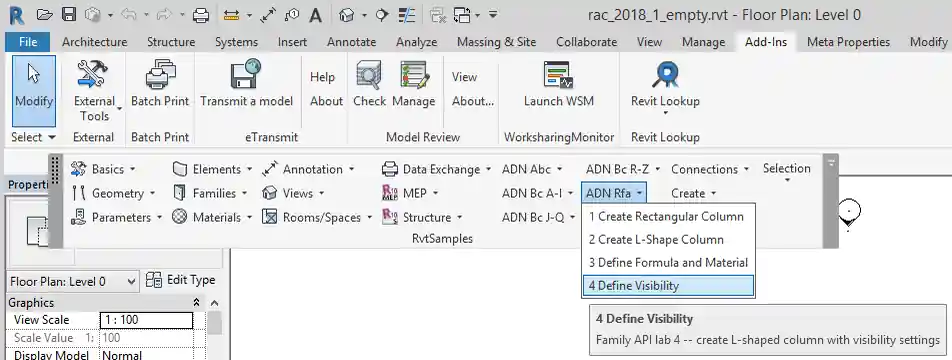
Access to Modified Combo Box Setting
The ADN Xtra Labs migration was prompted by a question on accessing the ribbon combobox string ↗:
Question: I have a combobox located on my Ribbon. I would like to retrieve the selected value as a string to use in an external command. I set the value as a public string for the application but I can’t access it outside of it. Is there something special that needs to happen for this to work?
Answer: This should be pretty simple.
The ADN Revit API labs ↗ and my Xtra labs ↗ include the C# and VB projects UiCs and UiVb demonstrating how to create the combo boxes.
Prompted by my look at them to answer your question, I migrated the latter to Revit 2018, while I was at it.
Take a look at the lines 395 to 452 in 1_Ribbon.cs ↗, defining the methods AddComboBox and comboBx_CurrentChanged, or the corresponding ones in the VB version.
The comboBx_CurrentChanged event handler is notified and called when the combo box value changes:
/// <summary>
/// Event handler for the above combo box
/// </summary>
void comboBx_CurrentChanged(
  object sender,
  ComboBoxCurrentChangedEventArgs e )
{
  // Cast sender as TextBox to retrieve text value
  ComboBox combodata = sender as ComboBox;
  ComboBoxMember member = combodata.Current;
  TaskDialog.Show( "Combobox Selection",
    "Your new selection: " + member.ItemText );
}
Store the updated value somewhere and make it available via an externally accessible method or property on your class and you will be all set and ready to go.