Elasticsearch-Head, RevitLookup and Area Schemes
Originally Published inI ran the first query on the collection of tbc ↗ blog posts imported into Elasticsearch to experiment for the question answering system Q4R4 Question Answering for Revit API.
No spectacular results to report so far, but at least it works.
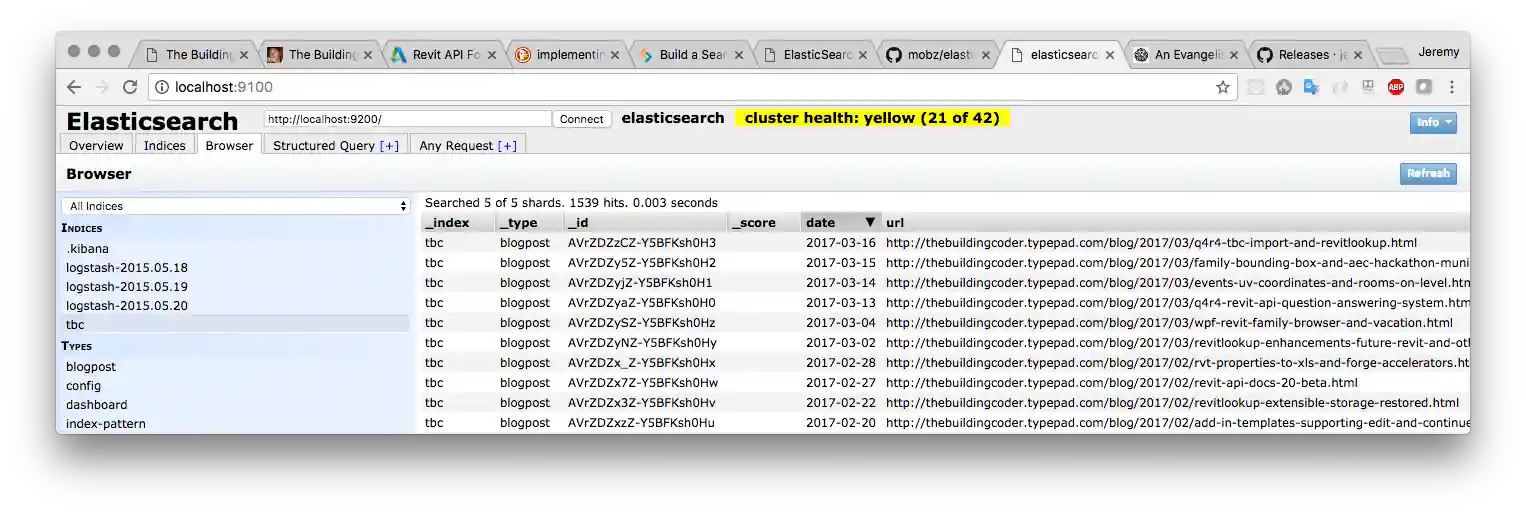
I installed the elasticsearch-head ↗ web front end to better explore and understand my local Elasticsearch cluster.
Alexander made a small correction to the latest RevitLookup enhancements, reverting one of the changes made yesterday.
Lots of interesting solutions on the Revit API discussion forum ↗, including a nice little filtering sample that I picked up:
- Elasticsearch text field mapping
- Elasticsearch-head web front end
- More RevitLookup updates
- Get area scheme from an area
Elasticsearch Text Field Mapping
Yesterday, I described the q4r4 tbc import script tbcimport.py that I implemented to import all The Building Coder blog posts into Elasticsearch ↗ to start experimenting with queries on them.
By default, the blog post text field was apparently imported and populated as a type keyword field:
$ curl -XGET 'localhost:9200/tbc/_mapping?pretty'
{
  "tbc" : {
    "mappings" : {
      "blogpost" : {
        "properties" : {
          "date" : {
            "type" : "date"
          },
          "nr" : {
            "type" : "long"
          },
          "text" : {
            "type" : "text",
            "fields" : {
              "keyword" : {
                "type" : "keyword",
                "ignore_above" : 256
              }
            }
          },
          "title" : {
            "type" : "text",
            "fields" : {
              "keyword" : {
                "type" : "keyword",
                "ignore_above" : 256
              }
            }
          },
          "url" : {
            "type" : "text",
            "fields" : {
              "keyword" : {
                "type" : "keyword",
                "ignore_above" : 256
              }
            }
          }
        }
      }
    }
  }
}
Since I want to run a full text search on the blog post text, I need to change that mapping. Actually, I might as well change it for the title field as well:
$ curl -XPUT 'localhost:9200/tbc?pretty' -H 'Content-Type: application/json' -d'
{
  "mappings": {
    "blogpost": {
      "properties": {
        "text": { "type":  "text" },
        "title": { "type":  "text" }
      }
    }
  }
}
'
Now the mapping looks more suitable:
$ curl -XGET 'localhost:9200/tbc/_mapping?pretty'
{
  "tbc" : {
    "mappings" : {
      "blogpost" : {
        "properties" : {
          "date" : {
            "type" : "date"
          },
          "nr" : {
            "type" : "long"
          },
          "text" : {
            "type" : "text"
          },
          "title" : {
            "type" : "text"
          },
          "url" : {
            "type" : "text",
            "fields" : {
              "keyword" : {
                "type" : "keyword",
                "ignore_above" : 256
              }
            }
          }
        }
      }
    }
  }
}
Elasticsearch-Head Web Front End
Typing curl scripts on the command line is probably not the most effective way to explore my local Elasticsearch cluster.
I installed the elasticsearch-head ↗ web front end to improve and simplify my interactive access.
As explained in its readme documentation, I must add two CORS settings to the elasticsearch config file elasticsearch.yml to allow elastic-head to connect to it:
  http.cors.enabled: true
  http.cors.allow-origin: "*"
With those settings in place, I can browse the cluster contents and start experimenting with queries on them:
More RevitLookup Updates
Two minor RevitLookup updates today, each encapsulated in an own new version.
Alexander Ignatovich, @CADBIMDeveloper ↗, aka Александр Игнатович, disagreed with one of the changes made yesterday and reverted that in his pull request #31 try-catch for each element in cycle is bad idea and looks ugly ↗.
Many thanks to Alexander for paying attention and fixing this!
That change is merged in RevitLookup release 2017.0.0.21 ↗.
I was unhappy with a couple of warning messages during compilation and fixed those in RevitLookup release 2017.0.0.22 ↗.
The most up-to-date version is always provided in the master branch of the RevitLookup GitHub repository ↗.
If you would like to access any part of the functionality that was removed when switching to the Reflection based approach, please grab it from release 2017.0.0.13 ↗ or earlier.
I am also happy to restore any other code that was removed and that you would like preserved. Simply create a pull request for that, explain your need and motivation, and I will gladly merge it back again.
Get Area Scheme from an Area
A Revit API discussion forum ↗ question on getting the area scheme from an area ↗ turned out to be a pretty trivial matter of accessing and evaluating a simple series of parameter values on the area and area scheme:
Question: I’m not sure if this is possible but I’ve been trying to get the AREA_SCHEME_NAME from a collection of areas.
I’ve tried several ways without luck.
Can an area report what Area Scheme (Gross, Rentable) it belongs to?
Answer: Have you tried this?
  Area area;

  AreaScheme scheme = doc.GetElement(
    area.get_Parameter(
      BuiltInParameter.AREA_SCHEME_ID ).AsElementId() )
        as AreaScheme;

  string areaSchemeName = scheme.get_Parameter(
    BuiltInParameter.AREA_SCHEME_NAME ).AsString();
Response: Thanks.
Here’s the code for a little test to get the areas that are on the ‘Gross Building’ scheme:
IList<SpatialElement> areas = new FilteredElementCollector( doc )
  .OfCategory( BuiltInCategory.OST_Areas )
  .OfClass( typeof( SpatialElement ) )
  .Cast<SpatialElement>()
  .ToList();

foreach( Element e in areas )
{
  AreaScheme _scheme = doc.GetElement(
    e.get_Parameter( BuiltInParameter.AREA_SCHEME_ID )
      .AsElementId() ) as AreaScheme;

  string _AreaSchemeName = _scheme.get_Parameter(
    BuiltInParameter.AREA_SCHEME_NAME ).AsString();

  if( _AreaSchemeName.ToString() == "Gross Building" )
  {
    TaskDialog.Show( "Revit", _AreaSchemeName );
    double ox = e.LookupParameter( "Area" ).AsDouble();
    TaskDialog.Show( "Revit", ox.ToString() );
  }
  else { continue; }
}
Answer: First, there are a couple of unnecessary inefficiencies in the sample code snippet.
There is no need for the Cast<>, and more importantly, ToList adds no value for this use case and consumes both time and memory, cf.:
I refactored the parameter accessing code as a separate little method to retrieve the area scheme name from the area element like this:
/// <summary>
/// Return the area scheme name of a given area element
/// using only generic Element Parameter access.
/// </summary>
static string GetAreaSchemeNameFromArea( Element e )
{
  if( !( e is Area ) )
  {
    throw new ArgumentException(
      "Expected Area element input argument." );
  }

  Document doc = e.Document;

  Parameter p = e.get_Parameter(
    BuiltInParameter.AREA_SCHEME_ID );

  if( null == p )
  {
    throw new ArgumentException(
      "element lacks AREA_SCHEME_ID parameter" );
  }

  Element areaScheme = doc.GetElement( p.AsElementId() );

  p = areaScheme.get_Parameter(
    BuiltInParameter.AREA_SCHEME_NAME );

  if( null == p )
  {
    throw new ArgumentException(
      "area scheme lacks AREA_SCHEME_NAME parameter" );
  }

  return p.AsString();
}
With that in hand, the retrieval of all areas matching a given area scheme can we rewritten like this:
/// <summary>
/// Retrieve all areas belonging to
/// a specific area scheme.
/// </summary>
public IEnumerable<Element> GetAreasInAreaScheme(
  Document doc,
  string areaSchemeName )
{
  return new FilteredElementCollector( doc )
    .OfCategory( BuiltInCategory.OST_Areas )
    .OfClass( typeof( SpatialElement ) )
    .Where<Element>( e => areaSchemeName.Equals(
      GetAreaSchemeNameFromArea( e ) ) );
}
I added these two methods to The Building Coder samples ↗ in release 2017.0.132.10 ↗.
You can see the new code by comparing with the preceding release 2017.0.132.9 ↗.