Restoring a Missing Project Information Element
Originally Published inSome people have recently reported that they encountered models lacking the ProjectInfo project information singleton element ↗.
Apparently, it was possible in previous versions of Revit for a faulty or malicious add-in to simply delete this element.
That obviously causes problems for other add-ins and Revit itself, who rely on its presence.
Luckily, it is not hard to fix.
Here is the latest discussion addressing this issue:
Question: I encountered models missing Project Information, causing errors to be thrown.
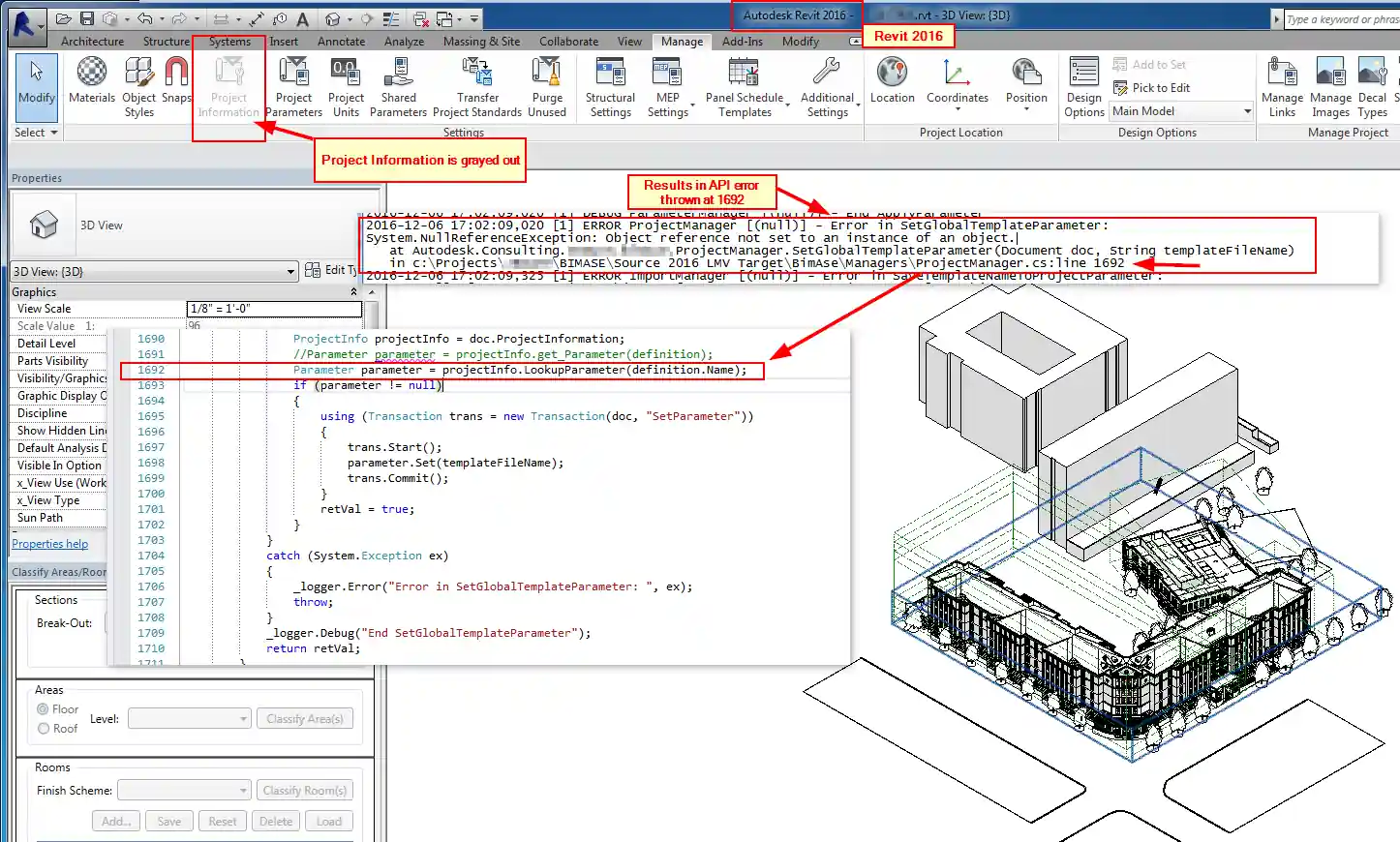
Can you provide any guidance on a potential fix for this?
Can we perform a Transfer Project Standards like process to copy the project information in from another model?
Answer: You can use the copy and paste API and the CopyElements method ↗ to copy in the project information element from some other intact RVT file.
The file can also be fixed via transfer project standards ↗.
We believe this problem to be fixed in Revit 2017 and later version, because API applications are now prevented from (hopefully accidentally) deleting the element.
Response: Thanks.
I have been successful in using the copy-paste method to automate the process to circumvent the errors and add the missing Project Information.
Thanks again for the help and suggestions!